
Aesthetix CRM Essentials Onboarding
Overview
Our Essentials Onboarding is designed to be smooth, efficient, and easy to follow. The goal is to complete your CRM setup within 30 days. While timelines may vary depending on your business needs and the time dedicated to onboarding tasks and training sessions, full implementation is typically completed within 60 days. If onboarding extends beyond 60 days due to client-side delays, additional fees may apply.
During onboarding, we’ll guide you through setting up the core required and recommended features of Aesthetix CRM to support and streamline lead management. The majority of your account setup is based on the information provided in your onboarding intake form, allowing us to align the system settings with your unique business data.
Essentials Onboarding follows a three stage process: Kickoff, Setup, and Launch. Your input is essential throughout each phase, particularly in Setup when reviewing and refining templates to ensure they reflect your business model and the services offered at your practice. This collaborative approach helps create a personalized and cohesive experience within the CRM.
Aesthetix CRM Essentials Onboarding Phases
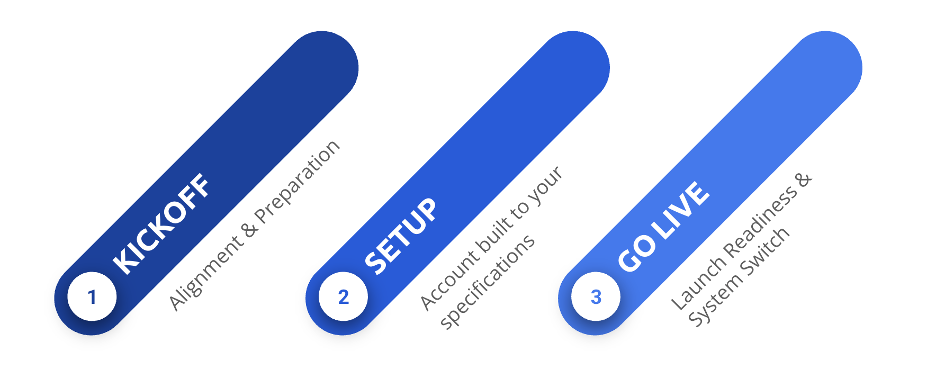
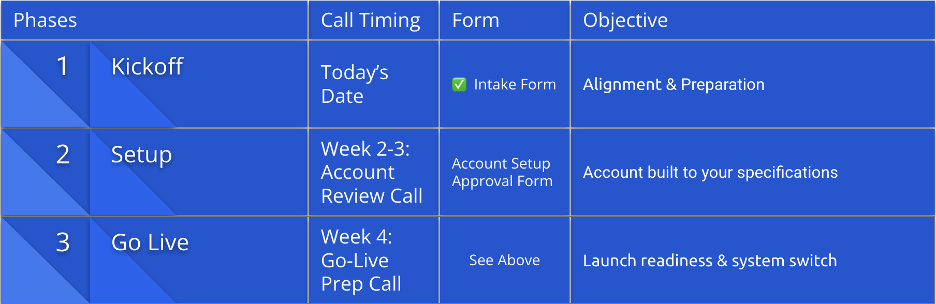
Any customization requests outside the standard setup must be submitted separately for review and consideration. This structure allows us to implement your CRM efficiently while still providing flexibility for additional enhancements as needed.
Over the first four weeks, we’ll guide you through system setup, data collection, and workflow automation across each stage of the patient journey, including EMR integration if applicable. We’ll also take time to understand your business operations to ensure the CRM is configured to support seamless lead management and effective day-to-day patient communication.
Included in Essential Onboarding:
Note: Items marked with * may require a specific subscription or an add-on request.
After the initial setup is complete (as outlined in your Onboarding Intake Form), any modification requests may incur a change fee.
1. Account & Business Settings
Aesthetix CRM Configures
- Brand Board: Stores Brand Guidelines for easy template customizations; (Ex: Logo, Brand Colors, Typography if provided)
- Domains & Email setup: Creating a subdomain ex: info@msg.businessdomain.com allows emails to be fully integrated with the CRM, ensuring reliable delivery, proper tracking, & centralized communication.
- Phone & SMS/MMS functionality: We provide you with a dedicated Aesthetix CRM tracking number that forwards to your main business line, enables call tracking, recording, spam reduction, and accurate source reporting across channels like your website, Google, and social media.
- Call Tracking Numbers (up to 10)*
- Call Recording (Client Approval Needed)
- Voice functionality
- Opportunities management
- Requirements: HIPPA compliant opt-in consent present on website contact form (for A2P Registration)
- Custom Values: Tailors marketing features and communications with your Practice Information for a personalized experience.
- Custom Fields: is a user-defined setting or data field that allows you to tailor workflows, automation, and system behavior to match your practice’s specific operational needs.
- *AI Employee*: Upon Subscription Agreement (Initial Setup; Conversation AI, Voice AI, Reviews AI setup depends on Onboarding Intake Form)
2. Integrations
- Google Business / Analytics (Client Responsibility)
- Facebook & Instagram (Client Responsibility)
- EMR Integration* (setup follows standard documentation; customization not included. Aesthetix CRM Responsibility )
3. Automation & Workflows
Important: Workflow setup includes installing templates, configuring standard workflow triggers/actions, testing, and publishing as outlined in the Help Center.
Custom workflows or modifications are not included.
Included Workflows and Automations
Lead Capture Forms and Workflows: Automatically collects and centralize contact data from website forms, chat widget, and paid ads to personalize communications, track attribution, and manage the lead or patient’s journey. (Aesthetix CRM)
- Lead Capture Forms (up to 10) with customizable templates
- Client to provide all current forms present on the website and/or paid Ad Campaigns (if applicable)
- Includes 10 Lead Capture Workflows (within the first 60 days)
- Google Ads
- Meta Ads
- Website Forms
- Manual Opportunity
- Future or additional lead capture requests are the client’s responsibility, please review the Help Article here.
- Complete Custom Request Form Here if additional builds for a advanced onboarding add-on
Assignments – Lead & Opportunities (Aesthetix CRM)
- Global User Assignment: Defines who’s responsible for managing leads
- Manual Opportunity Creation
- ****AI-Enabled Lead Type Assignment – Subscription Specific
Lead & Patient Nurtures : (Clients Responsibility to Review, Revise, or Approve the provided Email & SMS Templates included in Automations )
- Lead Nurture
- Patient Nurture
- Replied/Engaged Nurture
- Cold Re-Engagement Nurture
- Missed Call Text-Back; After How Text Back
- Review Requests
4. Marketing Templates
- Media Library Upload (Brand Guidelines, Logo, Images, etc.)
- Generic Marketing Templates: 3 Branded by Aesthetix CRM (Campaigns or Blasts)
- QR Codes for campaigns
- WhatsApp* Subscription Specific
5. Social & Marketing Features:
- Social Planner*
- Review/Reputation Management – View & manage reviews
By the end of Essentials Onboarding, your CRM will be fully configured to align with your practice—ready to streamline operations, enhance patient engagement, and support sustainable business growth.
After establishing the foundation of your core business needs, please complete the following steps to provide consent and final approval of your CRM configuration and prepare for Go-Live.
Go-Live is defined as all automations and workflows being approved and published, forms being successfully updated on your website and ad campaigns, and all testing completed to ensure a seamless transition.
Onboarding Checklist | Go-Live Preparation
- Admin and User Training Webinars completed
- Account Approval Form Signed
- Onboarding Checklist Completed
Once these requirements are fulfilled, you will transition to our Customer Success team. You’ll gain access to ongoing support, best-practice resources, and optional growth expansion services—designed to help you drive measurable results and maximize long-term value with Aesthetix CRM.
Not Included In Essentials Onboarding:
Note: While some of these features may be available in your Aesthetix CRM subscription, setup or customization for these items is not included in Essentials Onboarding.
Custom builds or Advanced Onboarding add-ons may be purchased separately.
Complete Custom Request Form Here for quote.
1. Advertising & Marketing Features
- Ad Manager
- Affiliate Manager
- Blogs
- Funnels – Landing Page creation or customization (Only Templates Provided)
- Advanced Advertising Analytics (e.g., Google/Meta conversion actions)
2. Scheduling & Communication
- Calendars*
- SIP Desk Phone Integration
- Launchpad
- Gokollab & Communities
- Private App Integrations
3. E-Commerce & Payments
- E-commerce Setup or Customization
- Payments, including but not limited to:
- Invoices, Estimates, Documents, Contracts, Orders, Subscriptions
- Products, Coupons, Payment Integrations, Taxes
- Memberships
4. Workflows (Advanced Configurations)
Important: Essentials Onboarding includes only standard workflow setup as outlined above. Advanced workflow configurations are not included and may be requested via Advanced Onboarding. Complete Custom Request Form Here for Quote.
- Lead Capture: Aesthetix CRM
- Lead Capture workflows beyond 10 sources
- Future workflows outside the initial 60-day window
- Assignments – Lead & Opportunities: Aesthetix CRM
- AI-Enabled Opportunity Value Assignment
- Appointment Cancellation / No Show to Rebook
- Birthday Automations
- Post-Consult Automation
- Retention Reminders
- Win-Back Campaigns
- Points & Gift Card Reminders
- Memberships workflows
- E-Commerce workflows
- Treatment Pathways or Custom Nurtures
- Any additional workflows not explicitly included in Essentials Onboarding
5. Reports, Dashboards & Analytics
- Reporting Customization
- Dashboard Customization
- Custom Reports
6. Other Platform Features
- Certificates
- Communities
- Third-Party Automation Integrations (Zapier, Keragon, etc.)
- Marketplace App Integrations
- Surveys
- User Management – Setup of Admin/User Accounts & Permissions
- WordPress Hosting
- Pipeline Modification
I acknowledge that I have reviewed and understand the scope of the Essentials Onboarding package, including all services that are included and those that are excluded.
I further acknowledge that any advanced onboarding services requested beyond the Essentials Onboarding package will incur additional fees, which I agree to pay upon selection of those services.